TABLE OF CONTENTS
- Introduction
- Screening Decision logic Generator
- Decision logic Executor
- Record Prioritization
- Abstract Formatting
- Performance metrics during project
- Human-in-the-Loop Oversight and Accountability
Introduction
Laser AI Screening Ecosystem is not a single model, but a configurable system of specialized AI capabilities that can be deployed independently or combined into an end-to-end screening workflow. Each model addresses a distinct challenge within evidence review workflow, including models generating decision hints, formatting abstracts, prioritizing records, or translating review protocols into operational screening guidance (i.e. decision logic).
Because these components serve different purposes, they are complementary rather than redundant.
This modular architecture allows organizations to adopt only the capabilities they need while maintaining the flexibility to expand automation over time.
Components
The ecosystem includes multiple AI models, each optimized for a specific function:
- Screening Decision logic Generator converts eligibility criteria and protocol requirements into operational screening instructions and decision logic,
- Decision logic Executor evaluates record relevance and provides decision hints with supporting rationale and text highlighting for each screening question,
- Record Prioritization ranks records according to their likelihood of inclusion, helping reviewers focus on the most promising records first,
- Abstract Formatting transforms unstructured abstracts into standardized formats, making critical study information easier to identify and process.
Together, these components support the entire screening workflow, from protocol interpretation through screening execution.
Screening Decision logic Generator
Review protocols usually describe eligibility criteria in narrative form. Although this is appropriate for documenting the review methodology, the criteria may still require interpretation when they are applied to individual records. Different reviewers may understand the same wording differently, particularly when criteria are complex, overlapping, or dependent on information that is not fully reported.
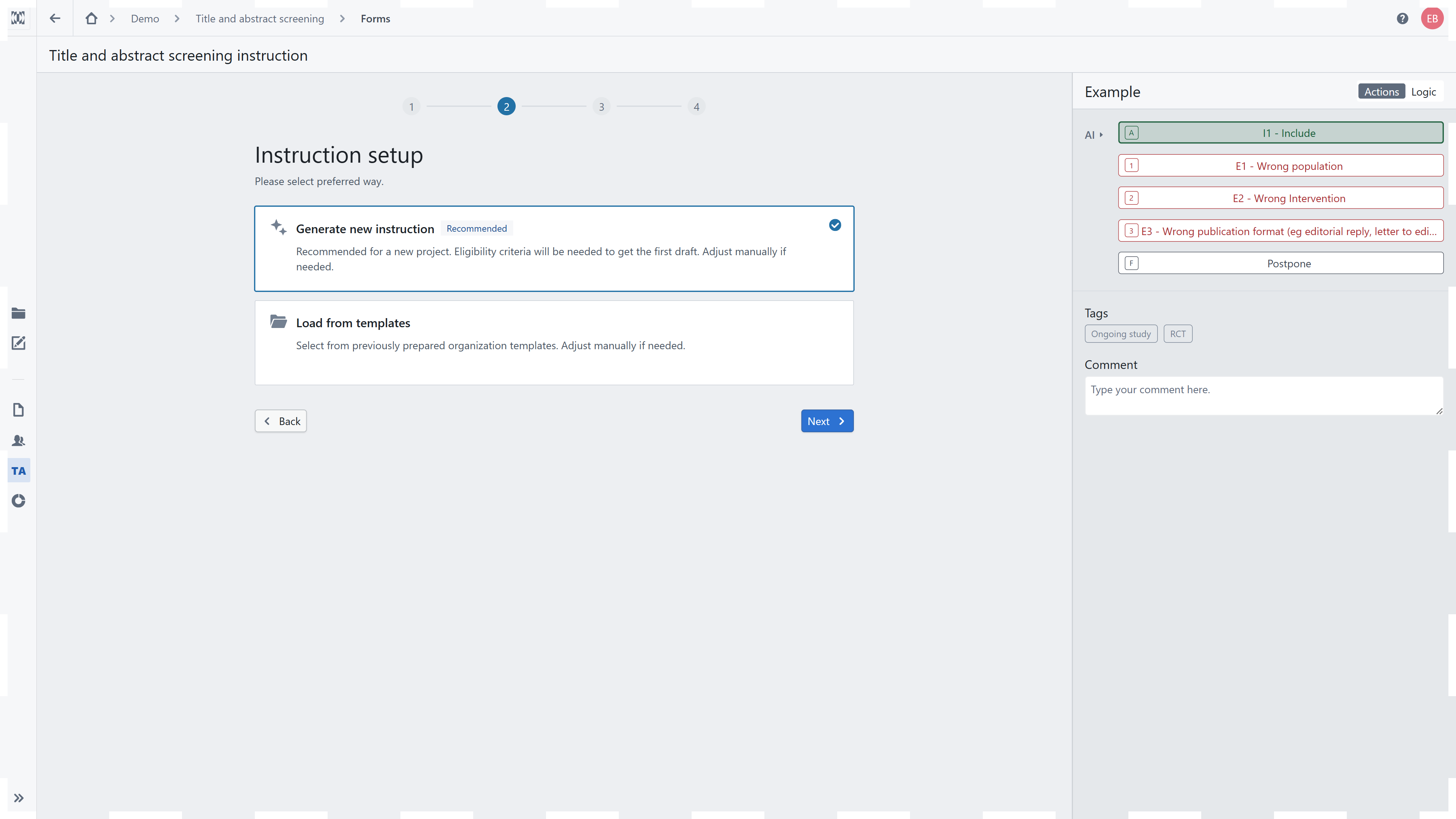
No prompt engineering required
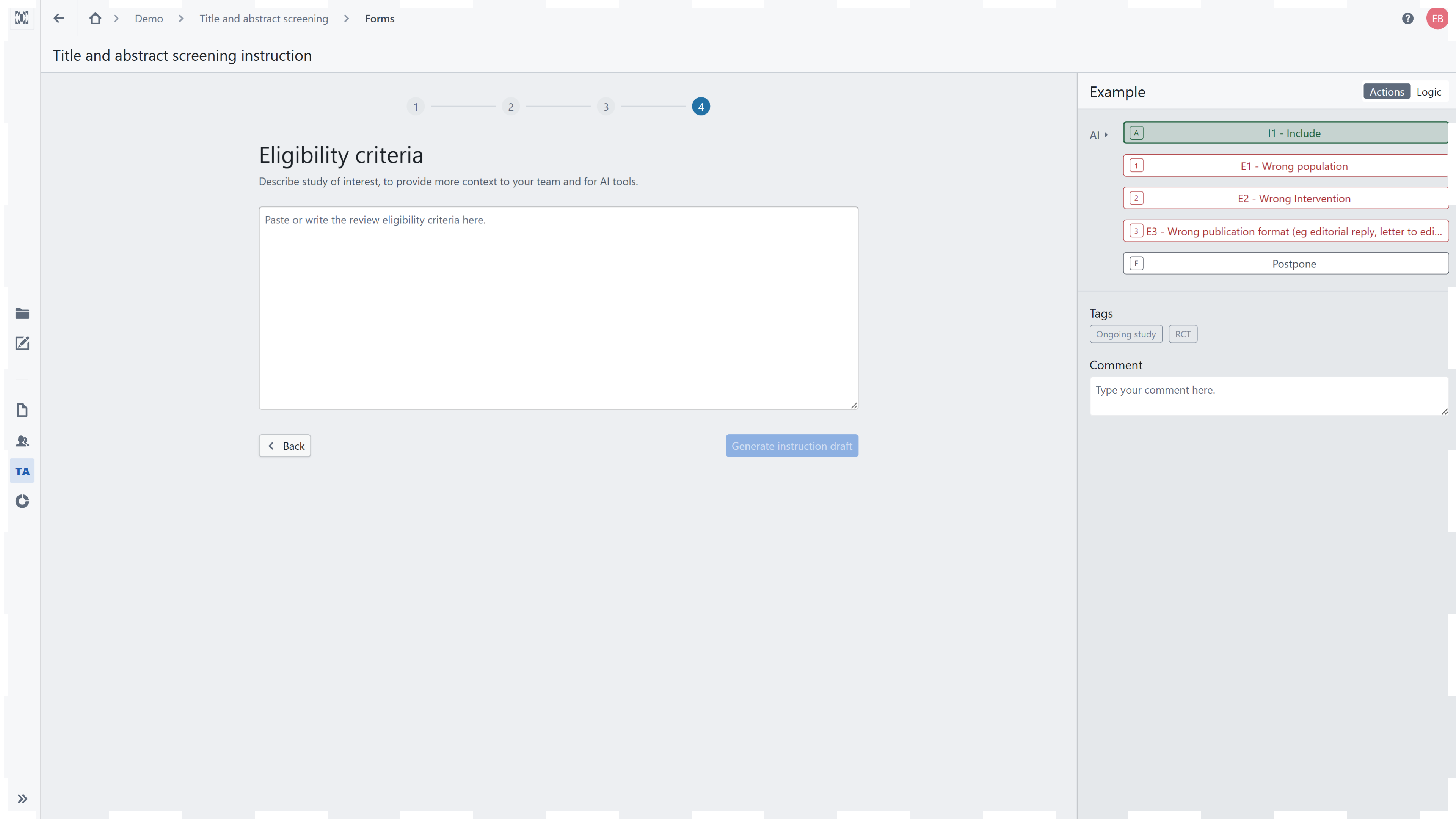
Reviewers do not need to write, test, or optimize prompts. They provide the eligibility criteria in the same methodological language used in the review protocol, and The Screening Decision Logic Generator handles the prompt construction required to generate a structured draft of screening questions and decision rules.
The reviewer’s task is methodological rather than technical: to verify that the generated logic correctly represents the protocol, refine it where necessary, and approve it before screening begins. This allows subject-matter and evidence-synthesis experts to use AI-assisted screening without having to become prompt engineers.
The Screening Decision Logic Generator converts the review’s eligibility criteria into a structured and operational screening instruction. Rather than simply repeating the protocol, it decomposes the criteria into screening questions and defines how the answers should lead to inclusion, exclusion, or an unclear decision.
The resulting decision logic creates a bridge between the review protocol and screening execution:
The protocol defines which studies are eligible.
The Decision Logic Generator translates these criteria into questions that can be applied consistently to individual records.
The project Team reviews and refines the generated draft.
The Decision Logic Executor applies the approved logic to records and generates evidence-linked decision hints.
Structure of the decision logic
Well-designed decision logic should:
address one eligibility concept in each screening question;
use clear wording that can be interpreted consistently;
specify how Yes, No, and Unclear answers affect the screening outcome;
connect exclusion outcomes with the relevant exclusion reasons;
distinguish missing information from information that confirms ineligibility;
reflect what can reasonably be determined from the title and abstract or full text at the relevant screening stage.
The order of questions also matters. Criteria that can determine exclusion clearly and efficiently may be assessed earlier, while questions requiring more detailed interpretation may appear later. This supports a consistent decision pathway across records.
Generating and reusing decision logic
For a new project, the first draft can be generated from eligibility criteria entered by the project team (recomended). Alternatively, an existing organizational template can be reused and adapted. Templates can support consistency across projects with similar review questions while still allowing project-specific modifications.
The generated output is a draft, not a replacement for methodological review. The project team should verify that:
all relevant (for tiab level) eligibility criteria are represented;
questions reflect the intended interpretation of the protocol;
decision pathways lead to the correct inclusion and exclusion outcomes;
exclusion reasons are appropriately mapped;
ambiguous or insufficiently reported information is handled as intended.
Testing the logic on a representative sample of records before the main screening begins can reveal unclear wording, missing decision paths, or criteria that require additional guidance.
A shared framework for Reviewers and AI
Once approved, the decision logic provides a common framework for both human Reviewers and the Decision Logic Executor. Reviewers can see the questions used by the model, examine its answers and supporting evidence, and assess the final decision hint against the same operational criteria.
This makes AI-assisted screening more transparent and auditable: the model does not provide an isolated prediction but applies a review-specific decision structure that has been defined and approved by the project team.
Decision logic Executor
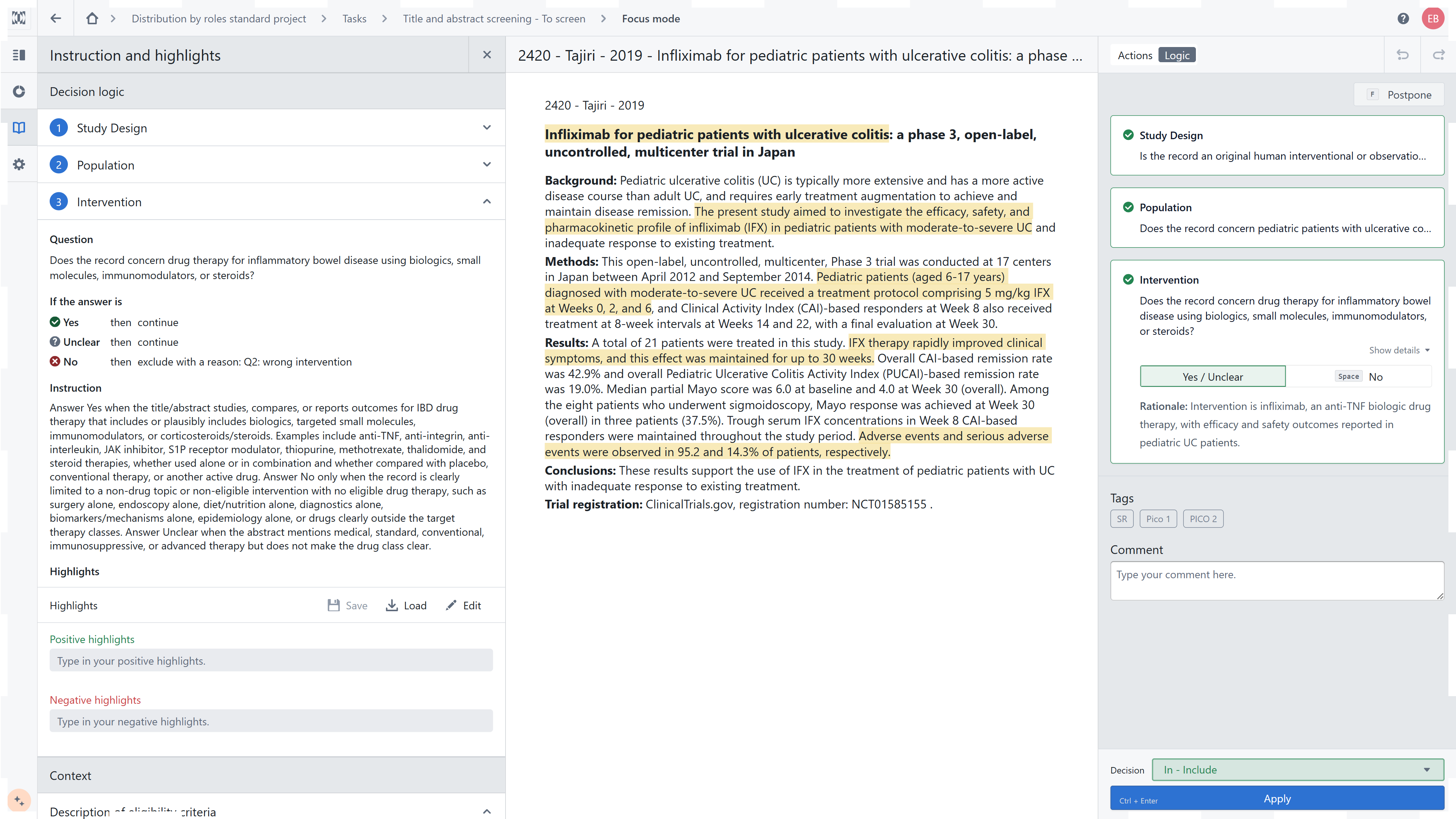
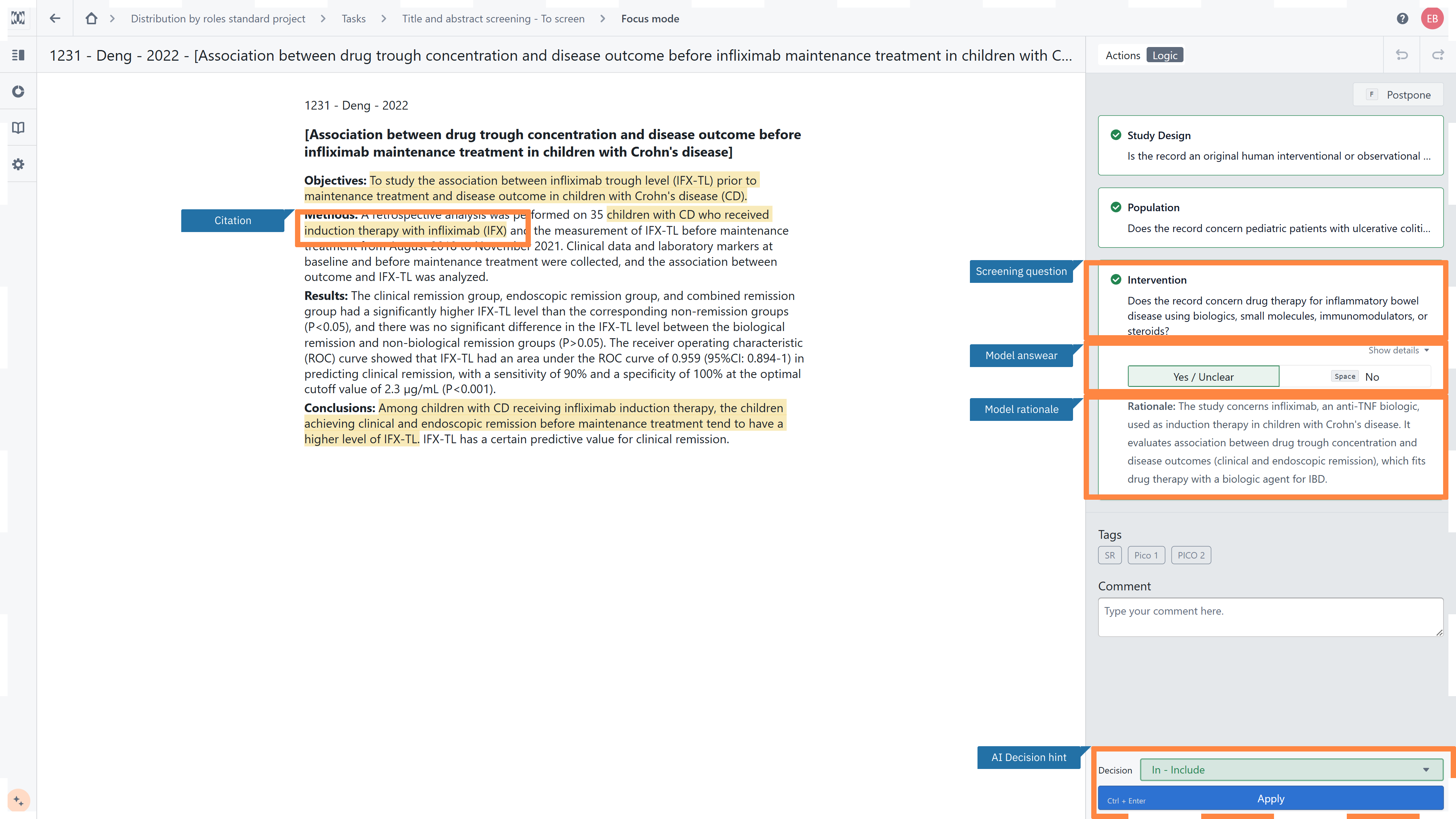
The Decision Logic Executor applies the project’s decision logic to each record during screening. It evaluates the available record text against every screening question and provides structured, evidence-linked recommendations to support the reviewer’s assessment.
For each screening question, the model provides:
a suggested decision, such as Yes, No, or Unclear;
a rationale explaining how the model interpreted the available information;
highlighted passages from the record that support the suggested answer.
Selecting a screening question opens its details, including the model answer and rationale. The corresponding evidence is highlighted in the record text, allowing the reviewer to compare the recommendation directly with the source information.
Based on the answers to the individual screening questions, the model also provides an overall AI decision hint. Depending on the decision logic and the available evidence, the hint may indicate Include, Exclude, or No prediction.
The reviewer should assess the suggested answers, rationales, and highlighted evidence before making the final screening decision. The AI decision hint supports this assessment but does not replace the reviewer’s judgement. The reviewer can follow or override the recommendation and then apply the final decision to the record.
Filtering records based on model suggestions
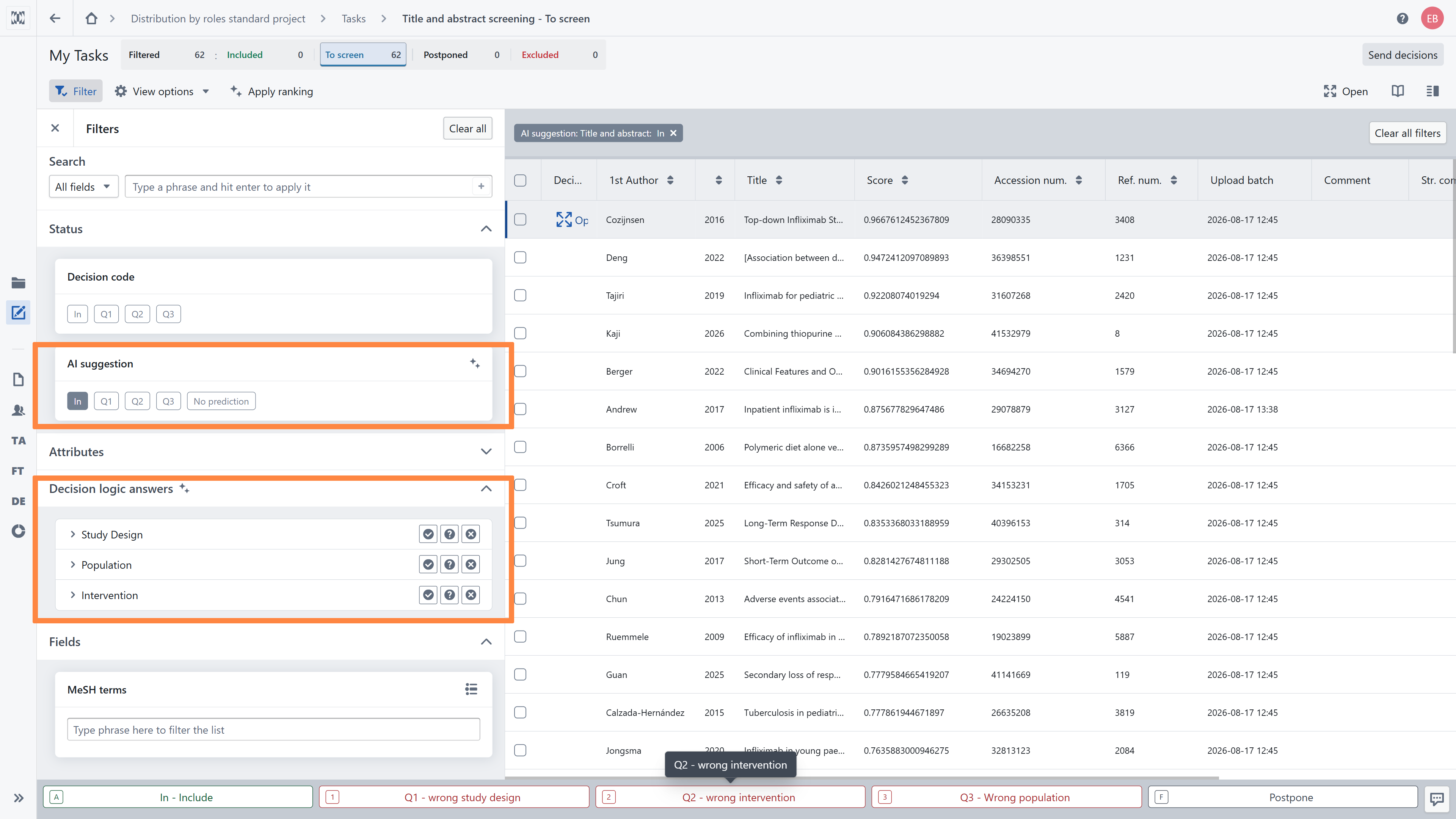
In the Reference List, open Filters and expand the Decision code section. Model outputs can be filtered at two levels:
AI suggestion – the overall decision hint for the record;
Decision logic answers – the model’s answers to individual screening questions.
The AI suggestion filter allows you to display records with an overall suggestion of Include, Exclude, Unclear, or No prediction.
The overall suggestion is generated by applying the project’s decision logic. Because this is an iterative process, an Exclude suggestion may be triggered by the first screening question that satisfies an exclusion rule. The overall suggestion therefore represents the result of applying the decision logic and should not be interpreted as a summary of all question-level answers.
The Decision logic answers filter allows you to select a specific screening question and filter records according to the model’s answer to that question. Question-level answers are available independently of the overall AI suggestion.
This more granular filter can be used to:
review records associated with a particular eligibility criterion;
examine how the model interprets the same criterion across multiple records;
review similar records consecutively, supporting a more efficient and consistent assessment;
identify screening questions that frequently receive Unclear answers.
Filtering by Unclear can help identify records with ambiguous or insufficiently reported information. These records can then be prioritized for discussion, or used during a calibration exercise.
Filters can also be combined with other Reference List filters. The resulting group of records can be reviewed individually or selected for the batch acceptance of AI suggestions.
Batch acceptance may be useful in workflows that permit a higher level of automation, such as exploratory evidence searches, or selected rapid and scoping review workflows. Before using it, the project team should confirm that:
- batch processing is consistent with the review protocol,
- test the decision logic on a representative sample, and
- define an appropriate quality assurance procedure.
For systematic reviews requiring human verification of each eligibility decision, reviewers should continue to assess records individually against the complete eligibility criteria.
Record Prioritization
Laser AI is a tool that uses Natural Language Processing (NLP) and Machine Learning (ML) to support Title and abstract screening. Our model supports your screening process by prioritising records based on their probability of inclusion. It means that during your screening, you will see the records with the highest likelihood of meeting your inclusion criteria first.
The model will be trained automatically as you start screening - you don't need to take any specific action to enable sorting by inclusion probability. To activate the sorting feature, you need to screen at least 32 records and have at least one included and one excluded record. If you choose to do your screening in the reference list instead of using the focus model, remember to click the AI model button, in focus mode the tool will automatically apply a new ranking.


Abstract Formating
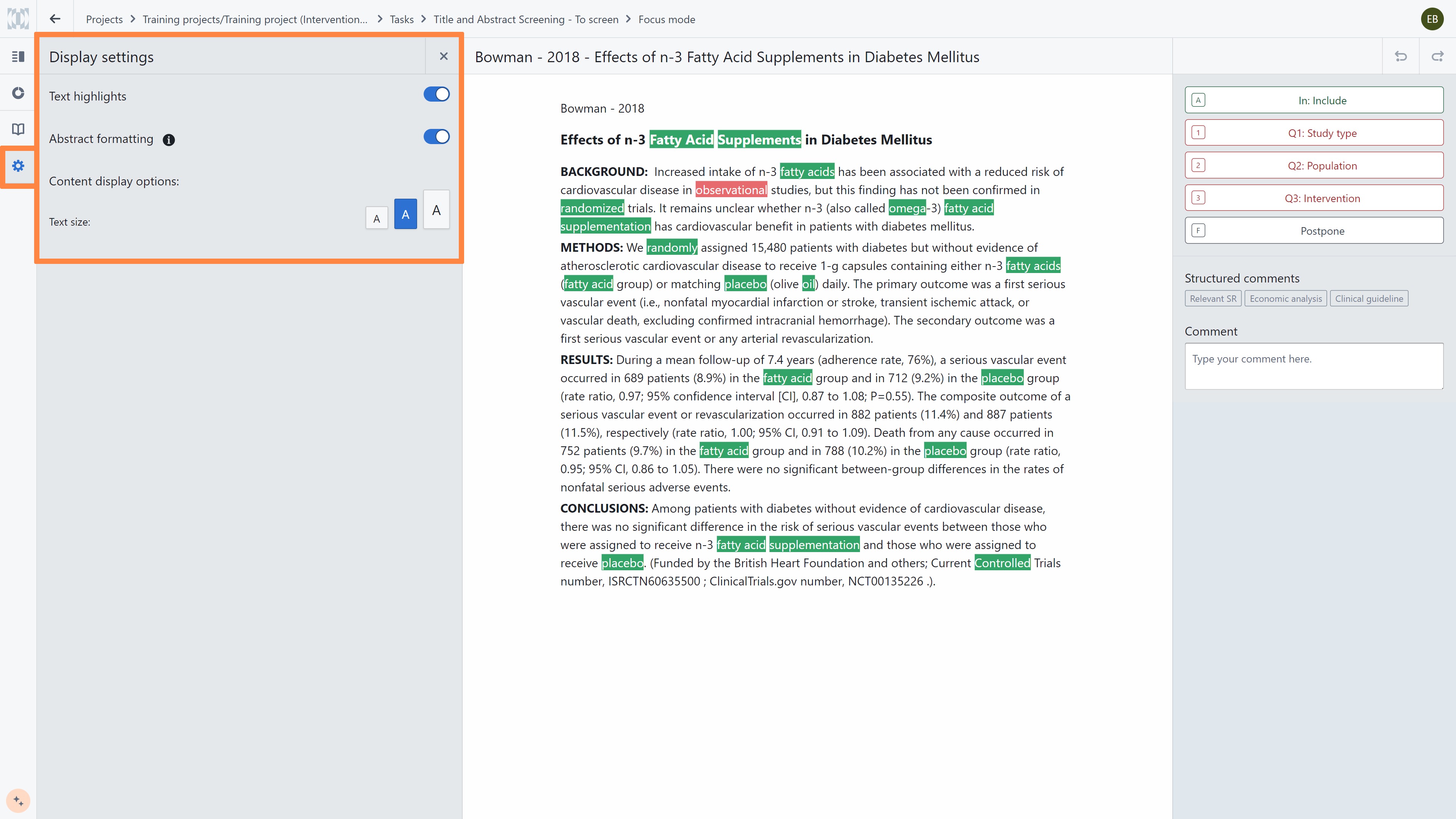
The Laser AI model improves the convenience of your screening process by supporting abstract formatting by adding paragraphs to the text. This feature makes it easier to review and screen assigned abstracts.
Abstract formatting is disabled by default. To enable it, simply click on the 'abstract formating' button in display setting. This will activate the feature and improve the visual presentation of the abstracts for easier reading and review.
Performance metrics during project
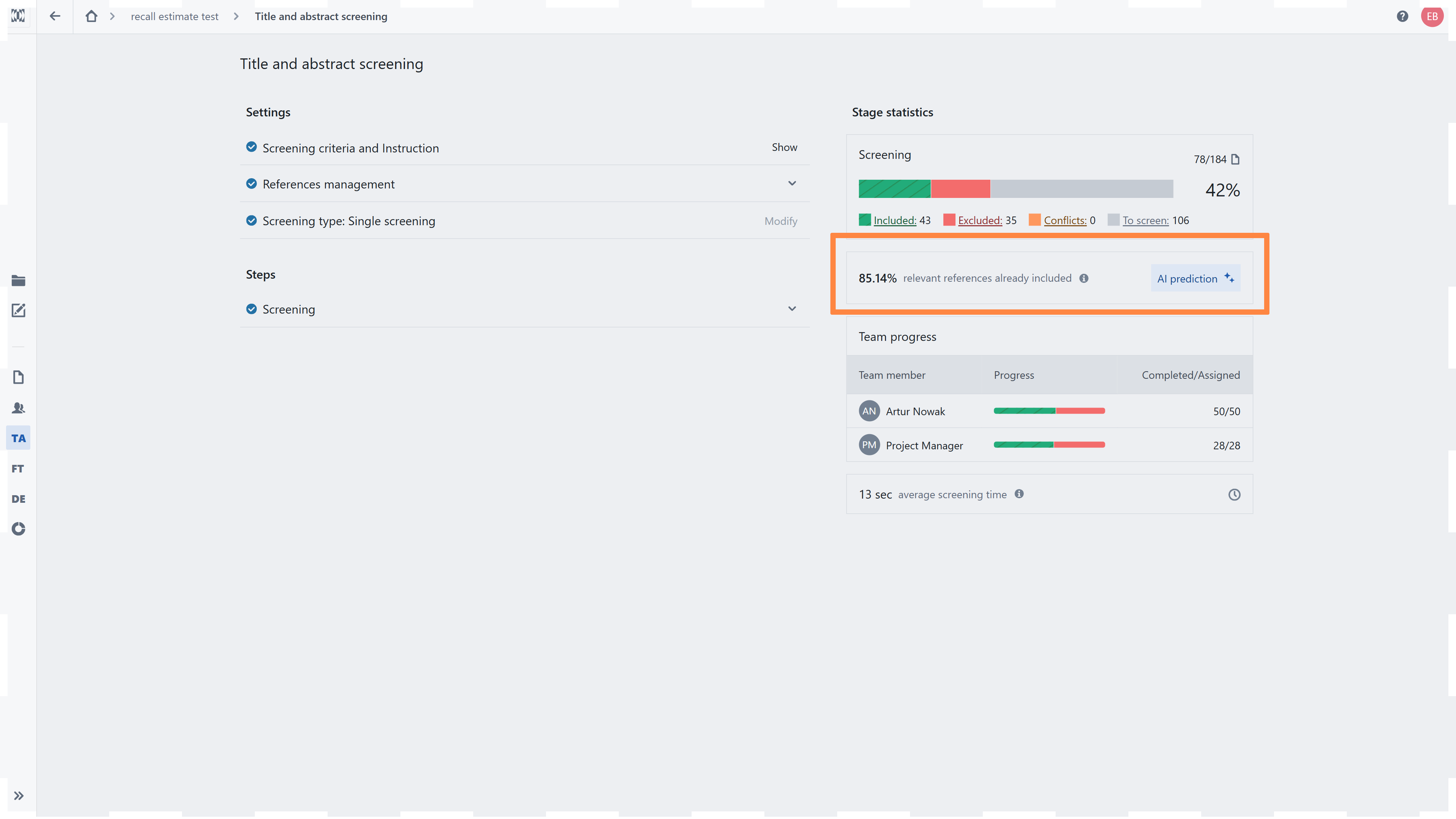
When the Decision Logic Executor is enabled, the Stage dashboard displays an additional model-based progress metric: relevant references already included.
This metric estimates the proportion of references considered relevant by the model that have already been identified and included by reviewers. It combines the model’s record-level predictions with the current screening decisions to indicate whether potentially relevant records are likely to remain among the unscreened references.
The estimate can be used to:
monitor screening progress during the project;
assess how many model-predicted relevant records have already been identified;
identify whether additional potentially relevant records remain to be screened;
If the estimate indicates that relevant records may remain, reviewers can use the AI suggestion filter to locate unscreened records with an Include decision hint.
This is a model-based operational estimate and not an observed recall value calculated against a complete reference standard. A high estimate should therefore not be used as the sole criterion for stopping screening. Any stopping rule should be defined in advance and remain consistent with the project protocol.
Human-in-the-Loop Oversight and Accountability
The Laser AI Screening Ecosystem supports reviewers at different stages of the screening workflow. The type of human oversight depends on the AI component being used:
Screening Decision Logic Generator: reviewers verify and, where necessary, revise the generated decision logic before using it for screening.
Decision Logic Executor:
For each question in the decision logic, the AI provides:
a suggested answer;
a rationale explaining the suggestion;
highlighted evidence linked to the relevant source text.
These elements allow reviewers to examine the evidence and reasoning behind each decision hint before making their final decision. Reviewers can therefore assess AI outputs critically and identify recommendations that do not appropriately reflect the eligibility criteria or the information reported in the record.
This workflow combines the efficiency of AI-assisted screening with human accountability, expert judgement, and methodological oversight
Record Prioritization: the model changes the order in which records are presented but does not make inclusion or exclusion decisions. Reviewers continue to assess the records and assign the final decisions.
Abstract Structuring: the model reorganizes the presentation of the abstract to improve readability. It does not evaluate study eligibility or replace the reviewer’s assessment.
Across the ecosystem, AI outputs support specific screening tasks, while reviewers retain methodological oversight and responsibility for decisions that determine study eligibility.
RELATED ARTICLES
- Display settings in the Focus mode: highlights enable, abstract formatting and changing colors
- How to perform Title and abstract screening?
Was this article helpful?
That’s Great!
Thank you for your feedback
Sorry! We couldn't be helpful
Thank you for your feedback
Feedback sent
We appreciate your effort and will try to fix the article