Documents libraries provide a centralized space for managing report templates used to present review results. These
templates help ensure consistency, standardization, and efficiency when generating project outputs.
By using document templates, users can quickly create structured reports aligned with organizational standards, reducing the need to build documents from scratch.
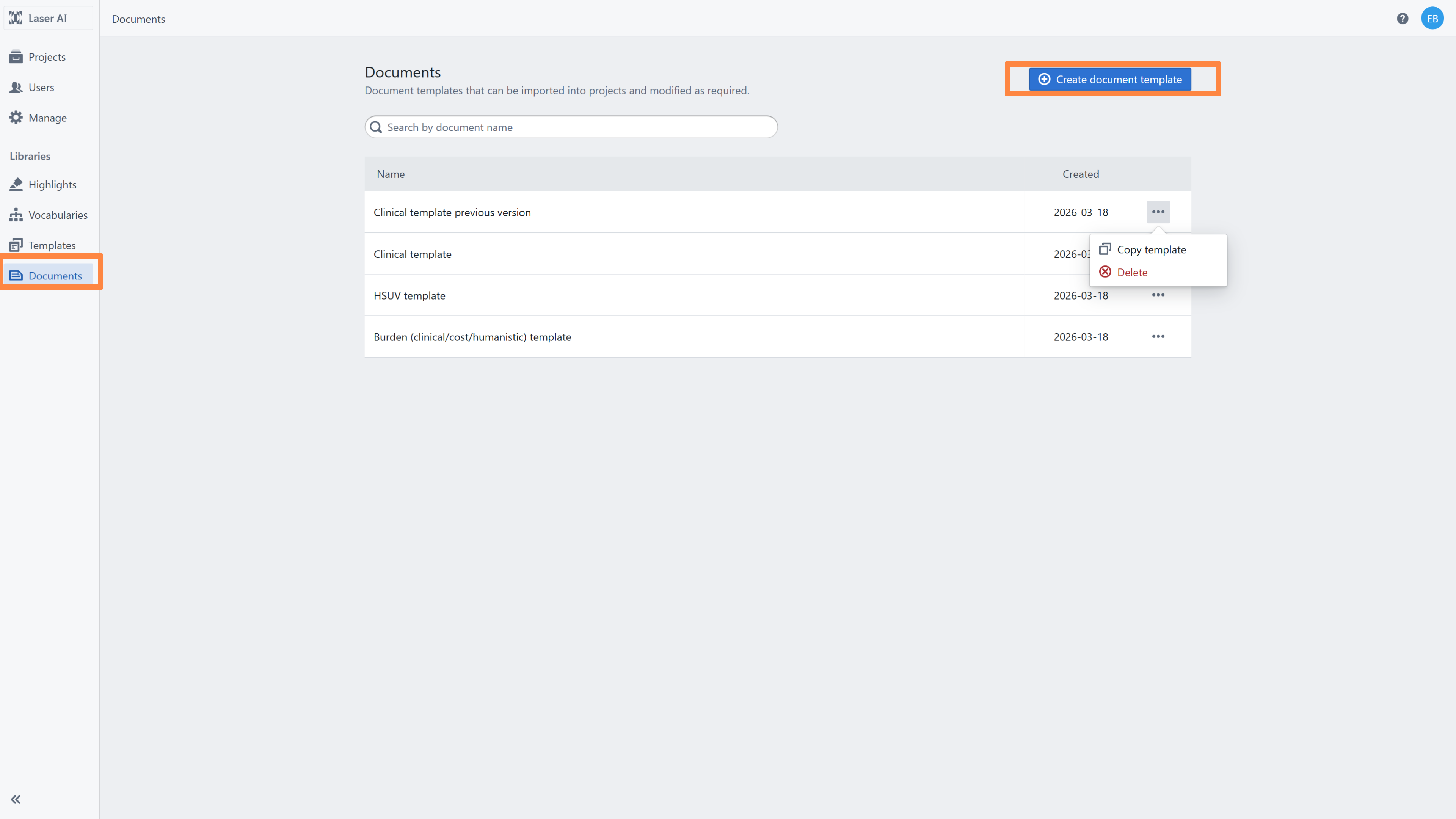
To access the documents libraries, click the Documents button in the left-side navigation bar.
On the main Documents Library dashboard, you will find all report templates that have already been created. You can use the search bar to quickly locate specific templates.
The library is available only to users with the Owner, Admin, or Data Manager roles. Other users (Members) can access these templates within projects if they have the Project Manager role.
By clicking the three-dot menu next to a template, you can:
delete the template,
create a copy of the template.
To create a new template, click the Create document template button.
Related articles
1. Introduction to Reusable resources
2. Creating Reports and Exporting
Was this article helpful?
That’s Great!
Thank you for your feedback
Sorry! We couldn't be helpful
Thank you for your feedback
Feedback sent
We appreciate your effort and will try to fix the article