Laser AI is designed to support structured, transparent, and efficient evidence synthesis. While the platform already follows established best practices, how you approach your daily work can make a significant difference in speed, consistency, and quality.
This article brings together practical recommendations on how to organize your work, use embedded features effectively, and avoid common pitfalls, so you can get the most out of Laser AI without adding unnecessary complexity.
1. Start Data Extraction with the Key Information
Some fields in the data extraction form are interconnected, specifically, information entered in one extraction field can be reused elsewhere in the form.
A common example is the intervention name (study arm). This field is used to automatically generate labels for subsections where data is extracted per study arm, such as baseline characteristics or outcomes. If intervention names are incomplete or inconsistent, it can create confusion later in the extraction process.
To learn more: Performing data extraction - start here to understand the process
2. Use Highlighting to Extract with Context
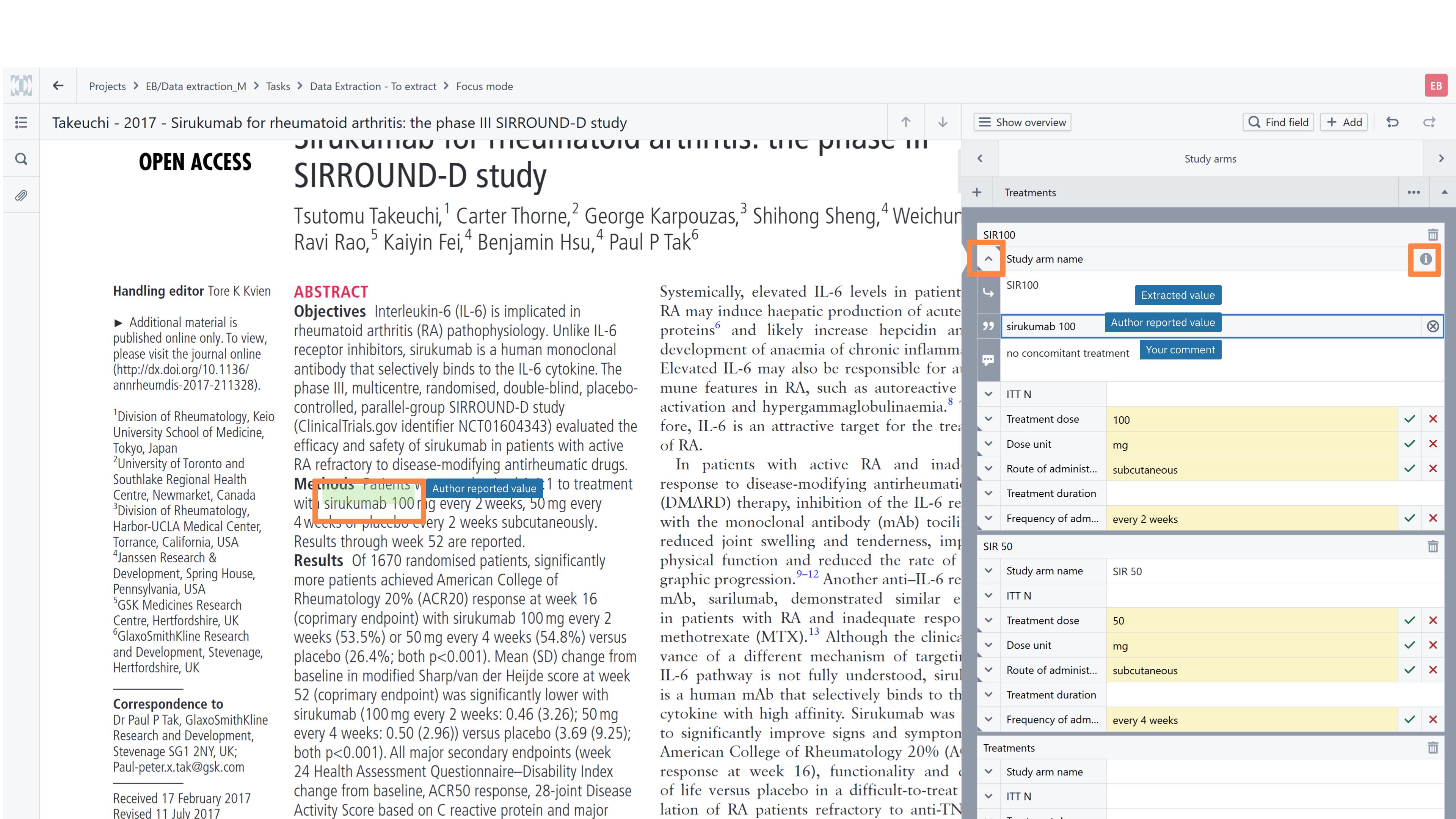
Every extraction field in Laser AI consists of three independent components:
Extracted value – the standardized or interpreted value provided by person performing data extraction (can be also a vocabulary value)
Author reported value – the exact quotation from the PDF
Comment – optional context, clarifications, or assumptions added by person performing data extraction
This structure provides both flexibility and traceability, allowing you to document not just what was extracted, but why.
Please note that all three components can be displayed in the extraction summary table, making reviews and audits more transparent.
How to Use Highlighting Efficiently
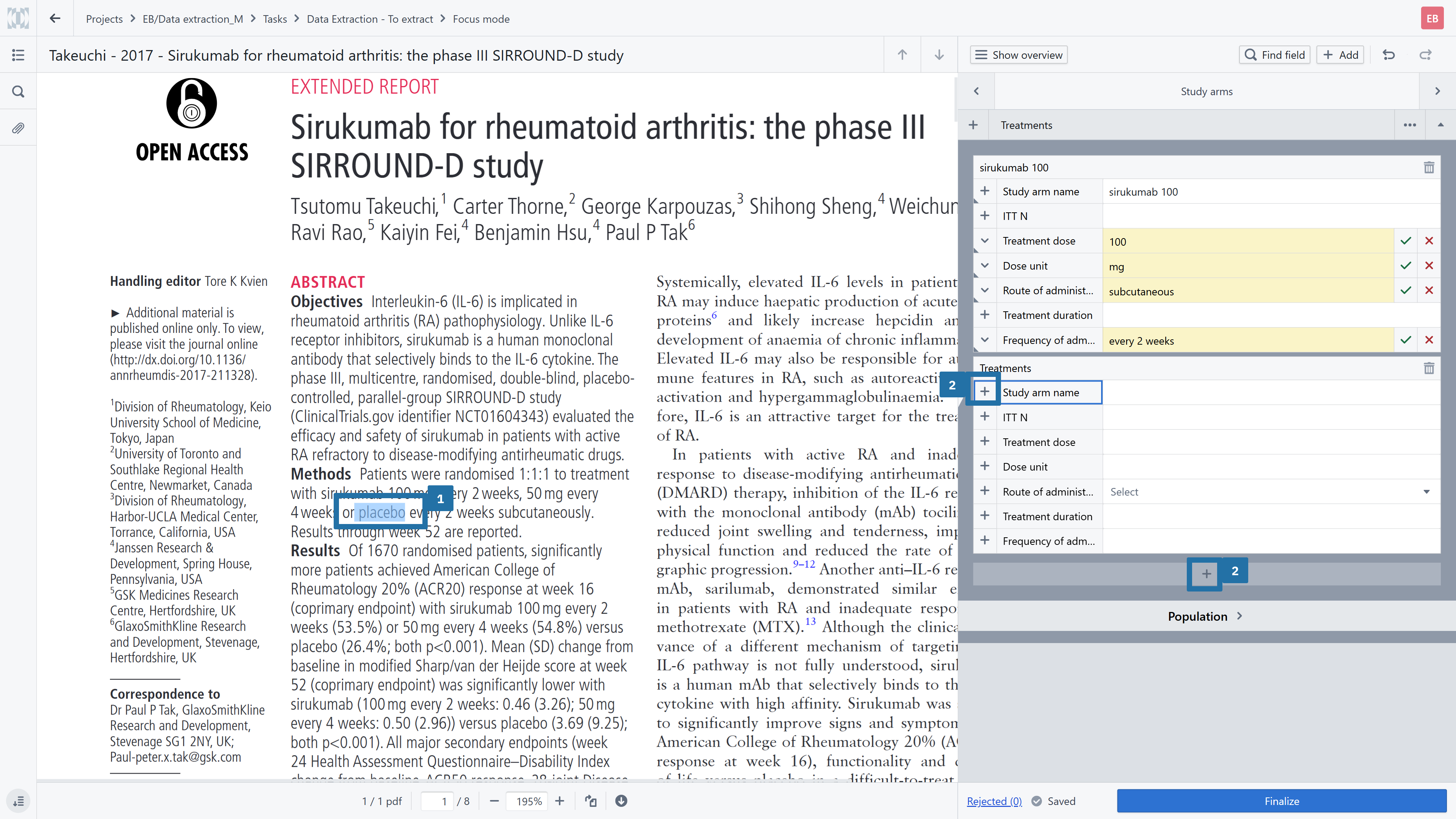
When working with a PDF:
Highlight the relevant phrase directly in the document.
Use the plus (+) button to copy the highlighted text into the Author reported value field.
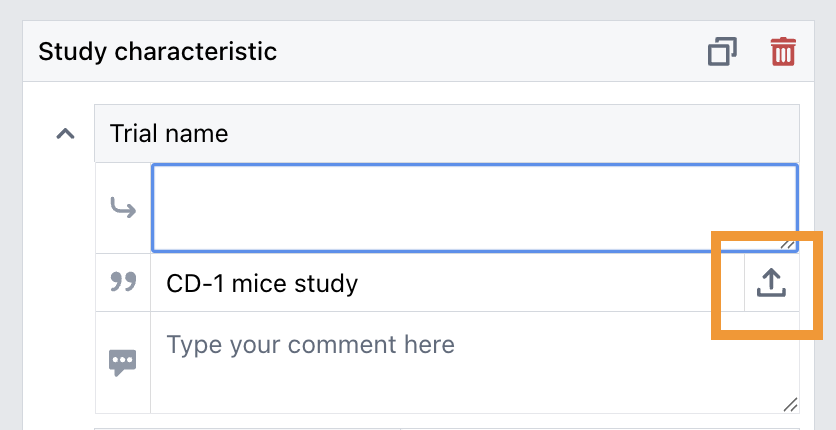
If the same text should appear the Extracted value, use the arrow button. This button will appear in the right corner of the Author reported value once you have placed the cursor in the Extracted value field.
If needed, you can adjust or standardize the Extracted value, this does not affect the original quotation in the Author reported value field.
Add clarifying notes or assumptions in the Comment field if helpful.
This approach not only speeds up extraction, but also creates a clear, auditable link between the extracted data and its source.
Make Quality Checks Faster and More Reliable
The combination of extracted values, quotations (author reported value), and optional comments becomes especially valuable during the quality assurance (QA) stage.
Reviewers can quickly:
Navigate to the exact source of a data point
Understand how interpretations were made
Verify decisions without searching through full-text PDFs
This significantly reduces back-and-forth communication and makes quality checks more efficient and consistent across the team.
3. Efficient Adjustment of Data Extraction Templates
Calibration is a critical step in any evidence synthesis workflow. Testing extraction forms on a subset of studies together with the reviewing team, helps identify gaps, ambiguities, or unnecessary complexity early on.
However, once a data extraction template is uploaded to a project and records are distributed, editing options within that project are intentionally limited. This protects consistency and data integrity during active work.
Use Organization-Level Templates for Iteration
Laser AI provides reusable resources at the organization level. New customers receive a set of validated extraction templates prepared by the research team, designed to cover common use cases. While these templates serve as a strong starting point, adjustments are often needed to reflect project-specific requirements.
Recommended workflow:
Go to the organization library and make a copy of the extraction template.
Introduce your changes in this copied version.
Create a calibration project and upload the updated template.
Test it on a small subset of studies with the reviewing team.
If further refinements are needed, iterate on the organization-level copy.
Once the next version is ready, switch the template within the active project.
This iterative approach allows teams to refine templates without disrupting ongoing work or compromising consistency.
4. Choose the right task distribution method for your team
Laser AI offers flexible options for distributing screening and data extraction tasks among Researchers. When setting up a project, you can decide how many references should be distributed and select a distribution method that best fits your team structure, availability, and stage of the review. Within Laser AI, three distribution methods are available:
- Proportional assignment
- Individual assignment
- Open pool of tasks
Regardless of the selected distribution method, it is recommended to distribute tasks in smaller batches rather than assigning the entire set of references at once. Working in batches allows project leads to monitor progress, identify issues, and adjust subsequent assignment methods as needed.
Was this article helpful?
That’s Great!
Thank you for your feedback
Sorry! We couldn't be helpful
Thank you for your feedback
Feedback sent
We appreciate your effort and will try to fix the article